
TNREGINET – EC View, Guideline Value, Encumbrance Certificate Download
The TNREGINET portal (https://tnreginet.gov.in), managed by Tamil Nadu Registration Department, is an official online platform that helps Tamil Nadu residents access property and registration services from home.
With TNREGINET, you no longer need to stand in long lines at government offices. Everything is now digital, simple, and transparent. Through this portal, you can view EC online, check guideline value, calculate stamp duty, search documents, and complete property registration easily.
TNREGINET Registration
To use TNREGINET services like tnpatta, patta chitta online, EC View Online, and document services, first create your user account.
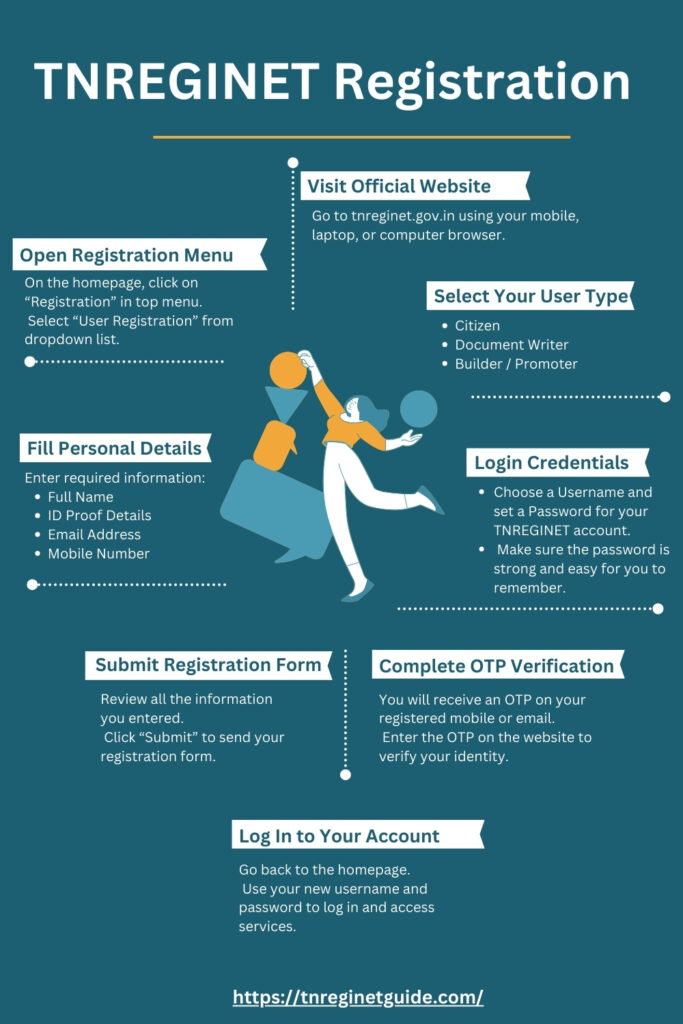
- Visit https://tnreginet.gov.in
- Click Registration > User Registration on homepage
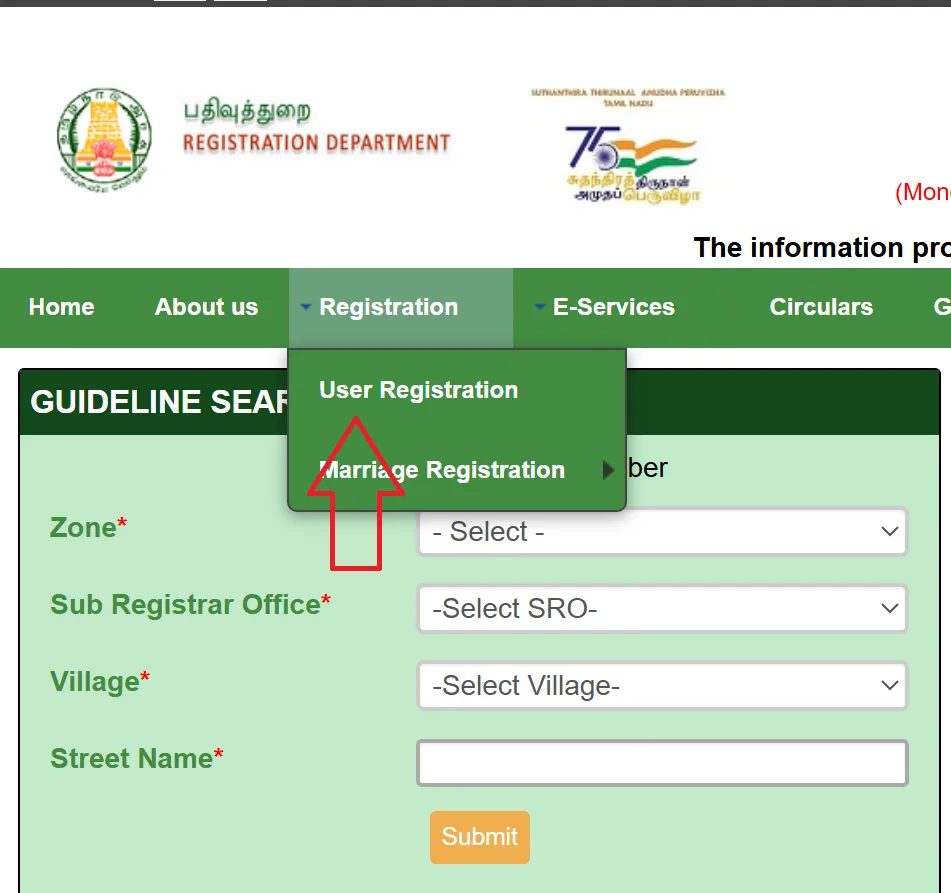
- Choose user type (Citizen / Document Writer / Builder)
- Enter username, password, security question, name, email, mobile number, and ID proof
- Submit form
- Verify using OTP sent to mobile or email
- Login after verification
Important Note
Use your account within 7 days after registration. Otherwise, it may get deactivated. Also, log in once every 3 months to keep account active.
Property Registration
You can register property documents such as sale deed, gift deed, or mortgage online.
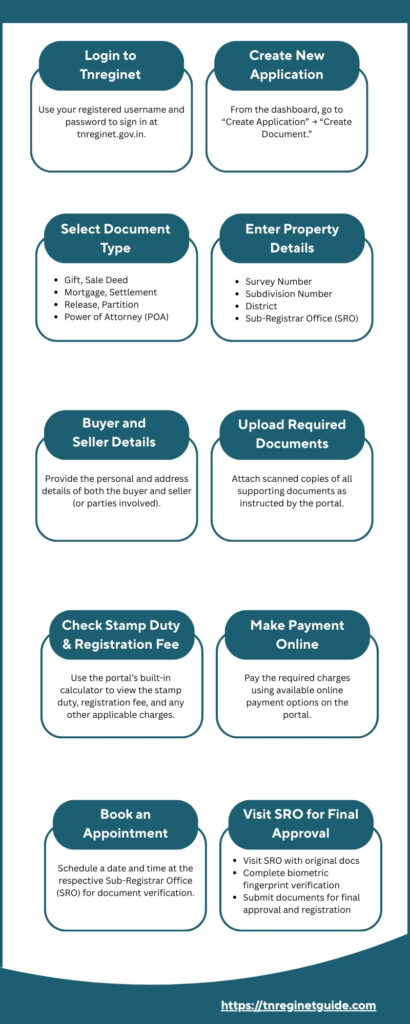
- Login to TNREGINET
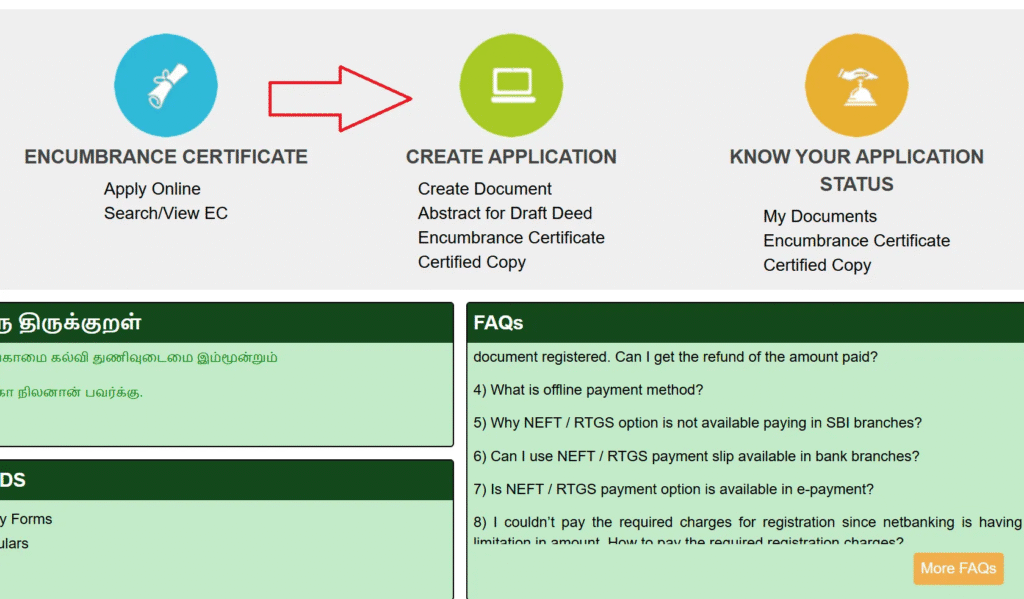
- Go to Create Application > Create Document
- Select document type (Sale Deed, Gift Deed, Mortgage, etc.)
- Enter property details like district, village, survey number
- Add buyer and seller details
- Upload required documents (ID proof, agreement, etc.)
- Calculate stamp duty using online tool
- Pay stamp duty online
- Book appointment with Sub-Registrar Office
- Submit application and save reference number
- Visit SRO on appointment date for final verification
Note
Registration charges depend on property type and value based on Tamil Nadu government rules.
View Encumbrance Certificate (EC)
Encumbrance Certificate shows whether property has any loan or legal issue.
- Log in to TNREGINET portal https://tnreginet.gov.in/portal/.
- Click E-Services > Encumbrance Certificate > View EC
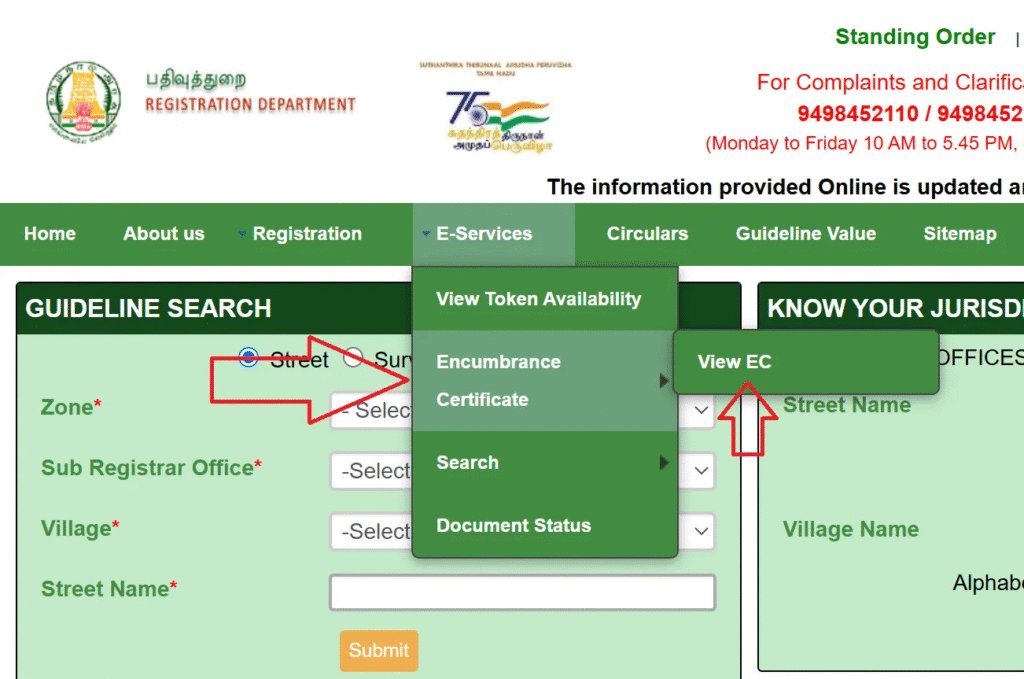
- Choose search type (EC / Document Wise / Plot Flat Wise)
- For EC search enter: Zone, District, Sub-Registrar Office, From / To dates, Village, subdivision number and Survey number
- For Document Wise search enter: Document number, Year and SRO
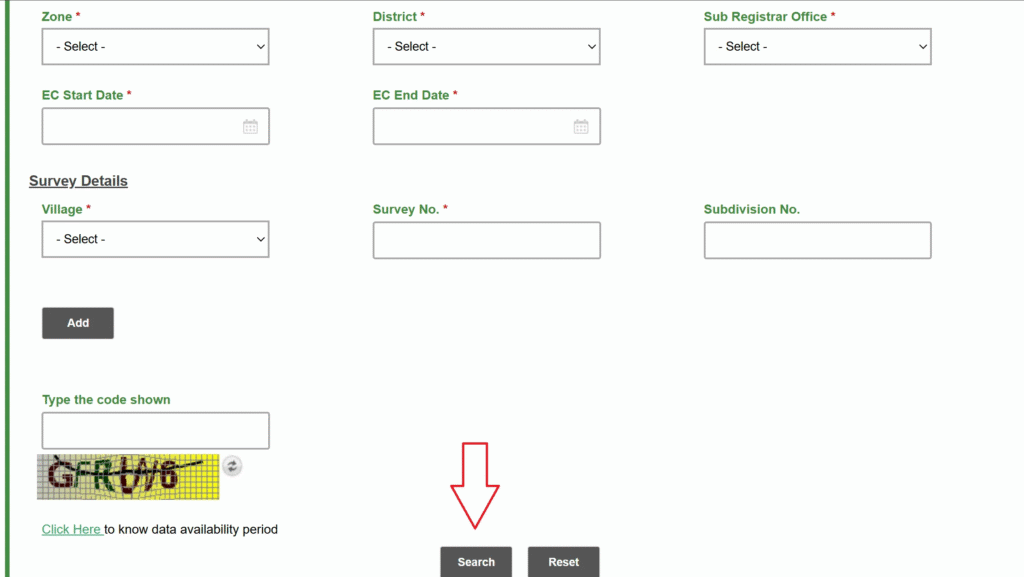
- Enter captcha and click Search
- View EC on screen and download PDF free
The ECView feature, also known as ‘Villangam’ in Tamil, provides a convenient way to quickly verify a property’s legal status through online services, saving time and effort for potential buyers and sellers.
Note
Certified EC copy may have small fee. EC available only for Tamil Nadu properties (up to 30 years record).
Difference Between EC Online Tamilnadu and Certified EC
| Type | Online EC | Certified EC |
|---|---|---|
| Cost | Free | Paid |
| Validity | Informational only | Legally valid |
| Use | Quick check | Bank loans, legal work, sale transactions |
Check Guideline Value
Guideline value is minimum property price fixed by government.
- Visit https://tnreginet.gov.in and click Guideline Value
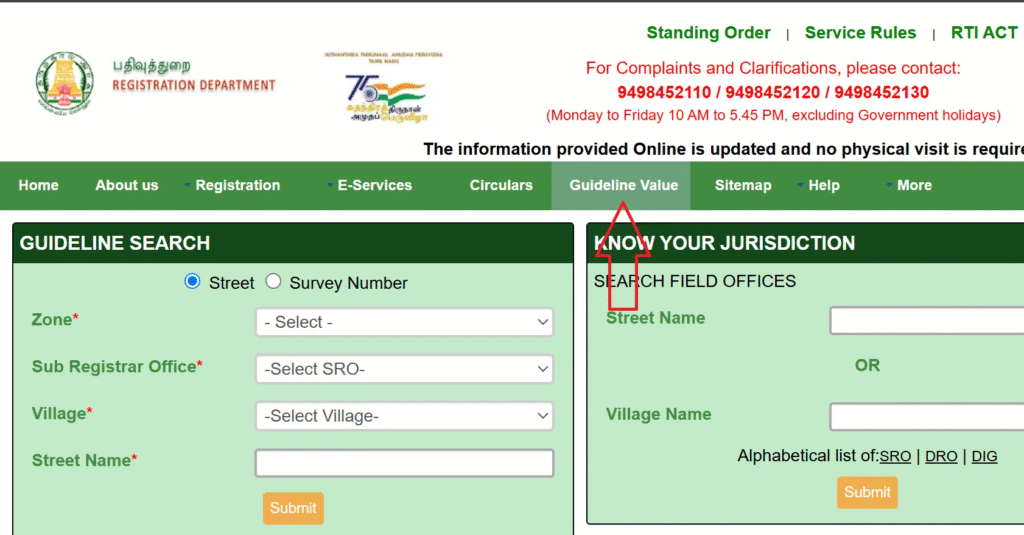
- Select date (latest values from 01-07-2024).
- Enter region, registrar office, village, street or survey number and land classification.
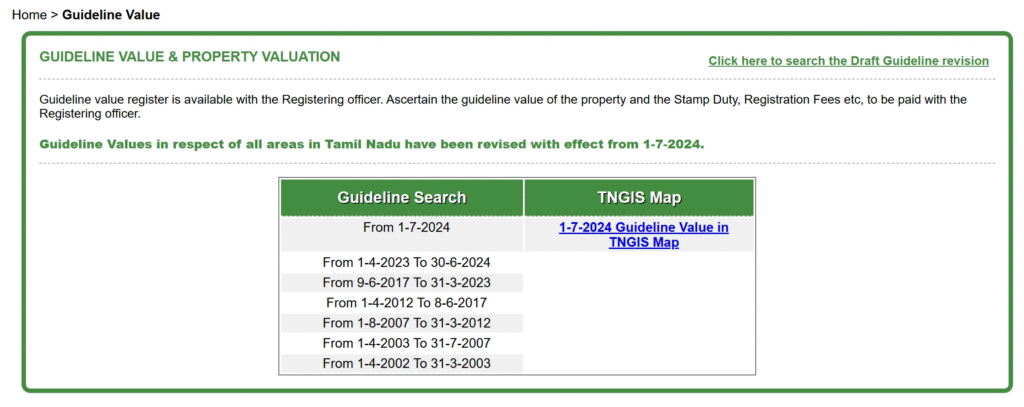
- Click Search to view the guideline value for the specified property.
- You can use this value to calculate stamp duty and registration fee.
Note
Tamil Nadu guideline values last updated on July 1, 2024.
Document Search and Download
To find old registered documents:
- Login to TNREGINET
- Go to E-Services > Document Search
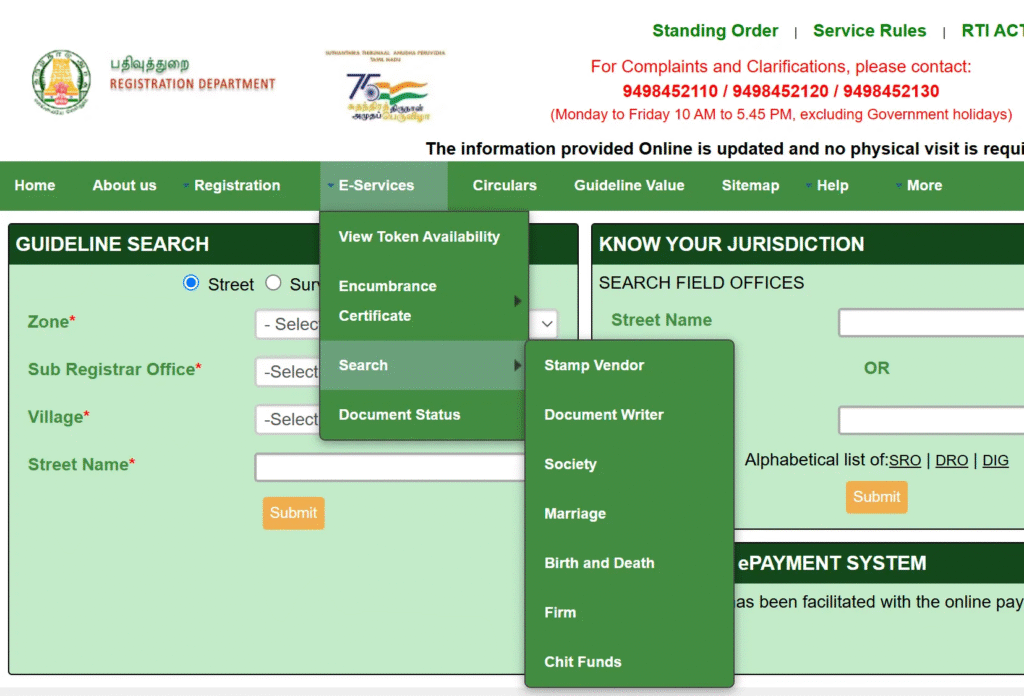
- Enter document number, party name, or property details
- Click Search
- View and download document
Marriage, Birth, and Death Registration
You can also apply for certificates online.
- Login to TNREGINET
- Click Create Application > Create Document
- Choose Marriage / Birth / Death
- Fill details and upload proof
- Submit application
- Track status using reference number
Check Jurisdiction
To know correct SRO for your property:
- Login to TNREGINET
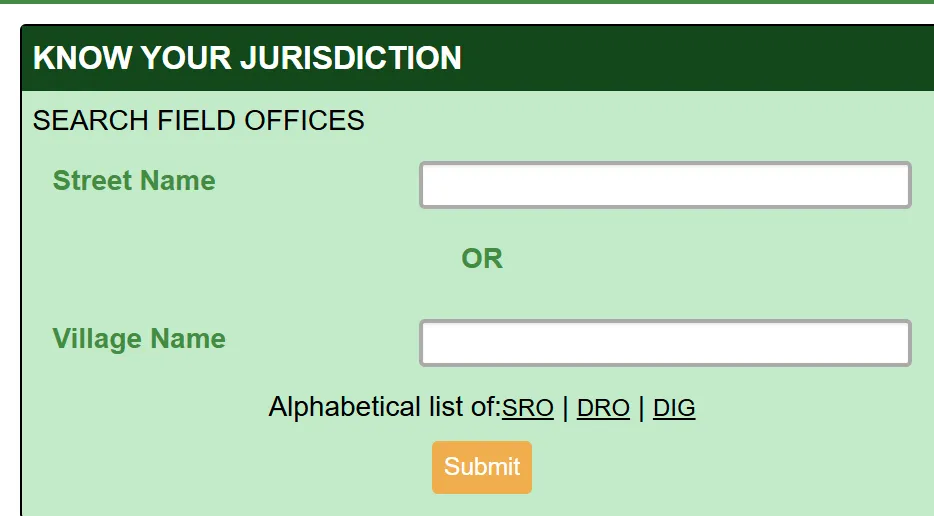
- Use KNOW YOUR JURISDICTION option on homepage
- Enter district, survey number, registration details
- Click Search and system shows SRO name and contact details.
Calculating Building Value
To estimate building value:
- Login to TNREGINET
- Click Calculate Building Value
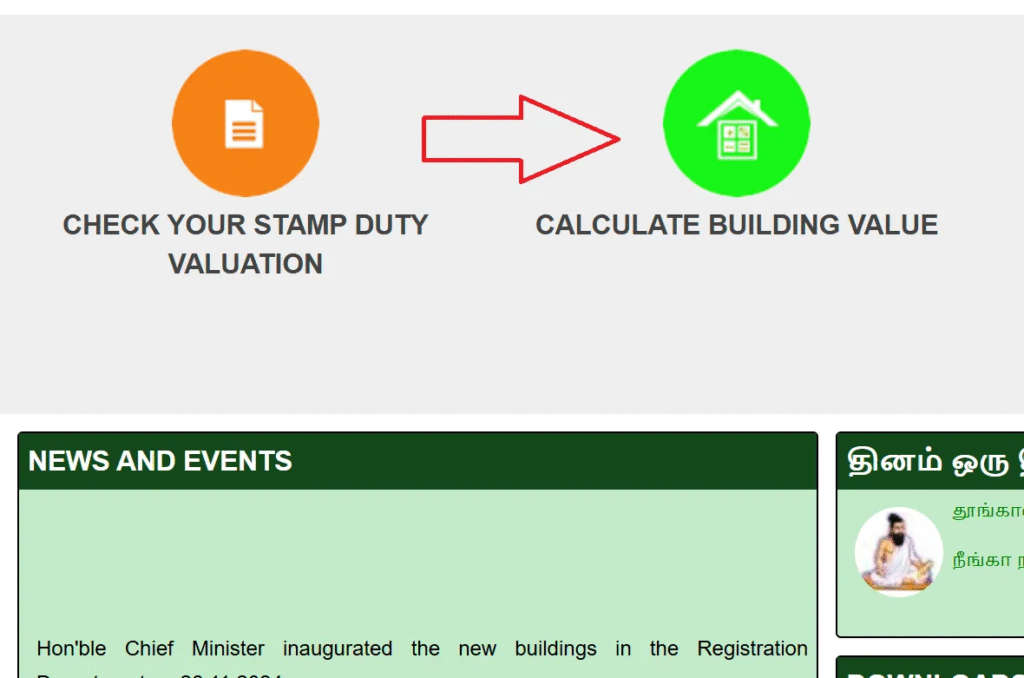
- Enter location, size, age, rooms, roof type
- Click Search, you will see estimated property value.
TNREGINET Portal
Tamil Nadu Inspector General of Registration Services.
Overview of TNREGINET
Digital Registration Platform
TNREGINET, also known as the Inspector General of Registration Services portal, is part of the state’s digital initiative under TNEGA. It supports services such as property registration, guideline value viewing, Encumbrance Certificate download, and document search. The platform makes it easier for citizens to access ec online services, Chitta Patta references, and patta download-related guidance through online facilities.
Accessibility and Registration
TNREGINET portal is available mainly for residents of Tamil Nadu. Most services require user registration to ensure security for personal and property-related information.
Key Features of TNREGINET
Core Platform Features
TNREGINET Tamil Nadu offers a wide range of online services for property and legal documentation:
Online Property Registration
Record sale papers, transfer documents, loan papers, and other property documents through internet.
Encumbrance Certificate (EC)
Check if a property is clear from legal or money problems using tnec view online services.
Guideline Value Search
Look up government-decided lowest property value. This helps understand official registration value.
Document Verification
Download digital copies of registered papers, deeds, and certificates. You can verify documents directly from the portal without visiting the office.
Certificate Services
Apply for marriage registration, birth certificates, death certificates, firm registration, society registration, and chit fund records through one simple dashboard.
User-Friendly Interface
Website is easy to use for all users. Easy to navigate, simple steps, and clear forms help you finish each service without any confusion.
Key Benefits
Time Efficient
Reduces processing time
Very Cost Effective
Eliminates travel costs
Paperless Process
Reduces physical paperwork
No Office Visits
Complete services online
Services Offered by TNREGINET
Complete List of Available Services
TNREGINET provides a wide array of online services designed to empower Tamil Nadu residents.
Property Registration
Helps users submit property records online and schedule appointments with SRO offices.
Encumbrance Certificate (EC)
Shows financial and legal status of a property for safe property transactions.
Guideline Value Search
Supports stamp duty estimation using the latest guideline values.
Document Search and Download
Provides access to old and registered documents.
Stamp Duty Payment
Allows online stamp duty calculation and payment.
Birth, Marriage, and Death Registration
Helps submit certificate applications online.
Jurisdiction Search
Shows the correct Sub-Registrar Office for property areas.
Building Value Calculation
Helps estimate property construction value.
Other Registrations
Supports registration of societies, firms, chit funds, and more.
Additional Information
Important Notes for Users
Patta Chitta Records
Land records such as Patta Chitta, Chitta Patta or patta chitta are not available on TNREGINET. For land records, visit Tamil Nadu e-Services portal.
Track Application Status
- Log in
- Click Application Status
- Enter reference number
- View current progress
Guideline Value vs Market Value
| Value Type | Meaning |
|---|---|
| Guideline Value | Minimum value fixed by government |
| Market Value | Actual price in the market |
TNREGINET Fees and Charges
| Service | Fee |
|---|---|
| Online EC | Free |
| Certified EC | Small fee (as per SRO) |
| Document registration | Based on property value |
| Stamp duty | % based on deed type |
| Copy of registered document | Extra fee |
Contact and Support
TNREGINET Helpdesk
Phone: 044-24640160
Email: helpdesk@tnreginet.net
Working hours:
- Monday to Friday: 8 AM to 8 PM
- Saturday: 10 AM to 5 PM
Note: Support is available in tnreginet Tamil and tnreginet English.
FAQs
Can I get Online EC for any state?
No, you cannot get an Online EC for any state. EC is only for properties registered in Tamil Nadu.
How many years EC can I check?
You can check EC for up to 30 years online.
Is online EC valid?
No, online EC is not valid for legal purposes. It is for informational purposes only. A certified EC is legally valid and required for official transactions.
Why is guideline value important?
Guideline value is important because it decides stamp duty and registration fees.
Can I register a property fully online?
No, you cannot register a property fully online. Document preparation is online, but final signing happens at SRO.
Can I correct wrong survey numbers?
No, you cannot correct wrong survey numbers online. You must visit the Sub-Registrar Office.
What if EC shows old loans?
If EC shows old loans, visit the bank and ask for release documents.
Can I download old documents?
Yes, you can download old documents if they are digitized. Old records may need an SRO visit.
Can I change jurisdiction?
No, you cannot change jurisdiction. Jurisdiction depends on property location.
Does TNREGINET show market value?
No, TNREGINET does not show market value. Only guideline value is shown.
What documents are needed for property registration in Tamil Nadu?
Sale deed, Patta-Chitta, EC, tax receipt, ID proof, and photographs.
What is guideline value?
Guideline value is the government-fixed minimum value used for guideline value calculation and stamp duty.
How to find my SRO office?
Use Know Your SRO Jurisdiction tool on TNREGINET by entering survey number or locality.
How to register property online in Tamil Nadu?
Document preparation, fee payment, and appointment booking are online via TNREGINET, but final registration happens at SRO.
